Monday, June 11, 2012

Queue VS Queue(of T)


I will prefer yo use Queue(of T)  instead of Queue because it is type safe and second it will not cast object type  in to appropriate type so performance is better.

Queue:

Queue is non generic type collection from name space(system.collection)
by default it can contain  any type  means it accept system.object(every type reference or value type derived from system.object class). Queue work on the principle of  FIFO(first in First Out) .it insert items like in array (one after other in sequence)
Module Module1
 Sub Main()
        Dim que As New Queue()
        que.Enqueue(1)
        que.Enqueue("Second")
        que.Enqueue(3)
        que.Enqueue("4th")
        Console.WriteLine("first in List")
        Console.WriteLine(que.Peek)
        que.Dequeue()
        Console.WriteLine("after deque first in List")
        Console.WriteLine(que.Peek)
        Console.ReadLine()
    End Sub
End Module


Out Put:

first in List
1
after deque first in List
Second

Queue(of T):

Queue(of T)  is  generic type collection from name space(system.collection.generic)
 it can contain a specific type means that its type safe so that you can't insert an integer and string in same list.
Dim lst As New Queue(of T)
where "T" can be integer ,string or any type.  if you will assign T as "Object" then it will work same as non generic type.Queue(of T) work on the principle of  FIFO(first in First Out) .it insert items like in array (one after other in sequence)

Module Module1

    Sub Main()
        Dim que As New Queue(Of Integer)
        que.Enqueue(1)
        que.Enqueue(2)
        que.Enqueue(3)
        que.Enqueue(4)
        Console.WriteLine("first in List")
        Console.WriteLine(que.Peek)
        que.Dequeue()
        Console.WriteLine("after deque first in List")
        Console.WriteLine(que.Peek)
        Console.ReadLine()
    End Sub
End Module

Out Put:

first in List
1
after deque first in List
2


I will prefer yo use Queue(of T)  instead of Queue because it is type safe and second it will not cast object type  in to appropriate type so performance is better .


Friday, June 8, 2012

Arraylist Vs List collection in VB.net

ArrayList:

arraylist is non generic type collection from name space (system.collection)
by default it can contain  any type  means it accept system.object (every type reference or value type derived from system.object class).
For Example:

Module Module1
    Sub Main()
        Dim lst As New ArrayList
        lst.Add("yousuf")
        lst.Add(2)
        Dim STR() As String = {"ashar", "kamran"}
        lst.AddRange(Str)
        For Each Obj As Object In lst
            Console.WriteLine(Obj)
        Next
        Console.ReadLine()
    End Sub

End Module

Out Put:
yousuf
2
ashar
kamran


LIST:

list is  generic type collection from name space(system.collection.generic)
 it can contain a specific type means that its type safe so that you can't insert an integer and string in same list.
Dim lst As New List(Of  T)
where "T" can be integer ,string or any type.  if you will assign T as "Object" then it will work same as non generic type.
For Example:

Module Module1
    Sub Main()
        Dim lst As New List(Of String)
        lst.Add("yousuf")
         Dim STR() As String = {"yasir", "kamran"}
        lst.AddRange(Str)
        For Each Obj As Object In lst
            Console.WriteLine(Obj)
        Next
        Console.ReadLine()
    End Sub

End Module

Out Put:
yousuf
ashar
kamran


I will prefer you to use List instead of arraylist because it is type safe and second it will not cast object type  in to appropriate type so performance is better .


Friday, June 1, 2012

How to apply css on RadDatePicker

Problem:

How to apply css on RadDatePicker? I am Applying css like that :

<telerik:RadDatePicker ID="RadDatePicker1" Runat="server" Culture="en-US"
CssClass="txt_box">
</telerik:RadDatePicker>

but is not working, it is giving me unwanted results.

Solution:

You should use "DateInput" tag in RadDatePicker. for example:

<telerik:RadDatePicker ID="RadDatePicker1" Runat="server" Culture="en-US">
       <DateInput CssClass="txt_box">
       </DateInput>

</telerik:RadDatePicker>

Wednesday, May 23, 2012

Find Label Control from Item Temple of RadGrid

Problem:

I am using GridTemplateColumn in RadGrid and I want find the label control which is in grid's ItemTemplate to update record.

I am using this code in grid's updatecommand,

VB CODE:
Dim Label1 As Label = CType(e.Item.FindControl("Label1"), Label)

but control is not found thus there is (nothing) in Label1.

Solution:

Try this,

VB CODE:
Dim Label1 As Label = DirectCast(CType(e.Item, GridEditFormItem).OwnerTableView.Items(e.Item.ItemIndex).FindControl("Label1"), Label)

Sunday, April 22, 2012

Code Snippets


Introduction:

Snippet is a programming term for a small region of re-usable source code, machine code or text. Code Snippets provide a way for you to insert ready-made snippets of code into your projects.

Advantages:

  • Write once use anywhere: Reduce the repeatable writing of code effort.
  • Define/Maintain a Coding Standard to be used for any Project/Organization.
  • Easy to use as well as create and also easily maintainable.
  • Share with other developers.
  • Increase productivity by making coding faster.

Creating a Snippet File:

To create a snippet file, you must create an XML file, and then write the XML code that makes up your code snippet.
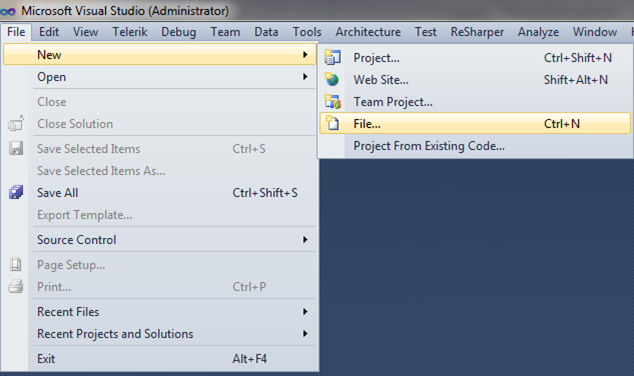
Following are the steps to create a snippet file:

Step1


Step 2


Step 3


Step 4


Step 5


Step 6


Manage Code Snippets:

The Code Snippets Manager allows you to set the directories and individual snippets that you want available to insert into your code.

To access the Code Snippets Manager :

      On the Tools menu, click Code Snippets Manager.

To add a directory to the Code Snippet Manager :

In the Language: drop-down list, select the language that you want to add a directory to.
Click Add. This opens the Code Snippets Directory window.
Select the directory that you want to add to the Code Snippets Manager and click ‘OK’. The directory will now be used to search for available code snippets.