Sunday, April 22, 2012

Code Snippets


Introduction:

Snippet is a programming term for a small region of re-usable source code, machine code or text. Code Snippets provide a way for you to insert ready-made snippets of code into your projects.

Advantages:

  • Write once use anywhere: Reduce the repeatable writing of code effort.
  • Define/Maintain a Coding Standard to be used for any Project/Organization.
  • Easy to use as well as create and also easily maintainable.
  • Share with other developers.
  • Increase productivity by making coding faster.

Creating a Snippet File:

To create a snippet file, you must create an XML file, and then write the XML code that makes up your code snippet.
Following are the steps to create a snippet file:

Step1
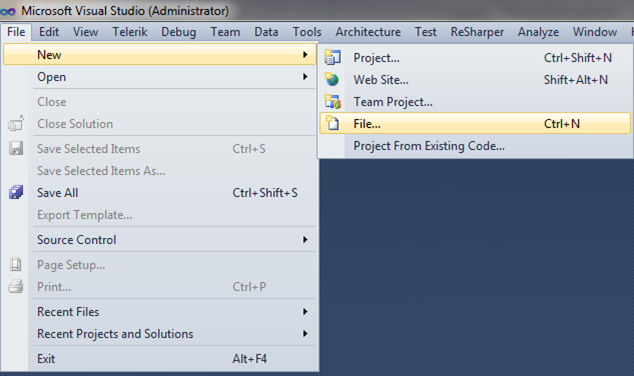


Step 2


Step 3


Step 4


Step 5


Step 6


Manage Code Snippets:

The Code Snippets Manager allows you to set the directories and individual snippets that you want available to insert into your code.

To access the Code Snippets Manager :

      On the Tools menu, click Code Snippets Manager.

To add a directory to the Code Snippet Manager :

In the Language: drop-down list, select the language that you want to add a directory to.
Click Add. This opens the Code Snippets Directory window.
Select the directory that you want to add to the Code Snippets Manager and click ‘OK’. The directory will now be used to search for available code snippets.

Monday, January 23, 2012

Update In LINQ not Working

Problem: I am working on a console application and I have a table in my .DBML File as FirstTable
I am using following code written below to update a field "Father Name" but it is still not updating it in Relational Database MS SQL.

VB Code:
Imports System.Data
Imports System.Collections.Generic
Module Module2
    Dim DB As New NorthWinddatacontext()

    Sub main()

        Dim UpdateName = (From p In DB.FirstTables Where p.Name = "Yousuf"
                       Select p).Single

        UpdateName.FatherName = "Hashmi1"
        DB.SubmitChanges()
    End Sub

My code is not working

Solution: You have not set any Primary Key on Your Table  in your Relational Database.Make a Primary Key and try the same code again by Droping the table again on Your DBML.

Friday, January 20, 2012

is neither a DataColumn nor a DataRelation for table DefaultView

Problem: I get this error when I try to filter any column in my RadGrid.I am using template columns.

"is neither a DataColumn nor a DataRelation for table DefaultView"

Here is my code of a Column
<telerik:GridTemplateColumn HeaderStyle-HorizontalAlign="Center" HeaderText="PO #" Visible="true">
 <ItemTemplate>
<asp:Label ID="lblPONumber" Text='<%# Eval("_PONumber") %>' runat="server">
</asp:Label>
</ItemTemplate>
<HeaderStyle HorizontalAlign="Center" />
</telerik:GridTemplateColumn>


Solution: You have to check that DataField property is present or not.

Here is corrected Code
<telerik:GridTemplateColumn DataField="_PONumber" HeaderStyle-HorizontalAlign="Center" HeaderText="PO #" Visible="true">
 <ItemTemplate>
<asp:Label ID="lblPONumber" Text='<%# Eval("_PONumber") %>' runat="server">
</asp:Label>
</ItemTemplate>
<HeaderStyle HorizontalAlign="Center" />
</telerik:GridTemplateColumn>

Wednesday, January 18, 2012

First Column of RadGrid to stay visible

Problem: I have many columns in my RadGrid ,I want first column to stay visible while scrolling.Only first column should appear all the time.
Solution: This can be done using FrozenColumnsCount in ClientSettings tag.

Example:
<telerik:RadGrid ID="radGridServices" runat="server">
    <MasterTableView CommandItemDisplay="Top" DataKeyNames="Services_ID_PK" ClientDataKeyNames="Services_ID_PK">
    </MasterTableView>
    <ClientSettings>
        <Scrolling AllowScroll="true" FrozenColumnsCount="1" SaveScrollPosition="true" UseStaticHeaders="true" />
        <ClientEvents />
    </ClientSettings>
</telerik:RadGrid>


Monday, January 16, 2012

Simple handling Of Events In Visual Basic .NET 4.0 Using Handler

Problem: How to handle events in Visual Basic .NET 4.0 using Handler ? 
Solution: Just Copy The Whole Code Below in Console Application

VB Code:
Module Module1
    Sub Main()
        Dim objWork As New Worker
        AddHandler objWork.WorkDone, AddressOf work_WorkDone
        objWork.DoWork()
    End Sub

    Private Sub work_WorkDone(ByVal completedWork As Integer)
        Console.WriteLine(completedWork)
    End Sub
End Module

Public Class Worker
    Public Event WorkDone(ByVal completedWork As Integer)
    Public Sub DoWork()
        For completedWork As Integer = 1 To 100
            System.Threading.Thread.Sleep(1000)
            RaiseEvent WorkDone(completedWork)
        Next
    End Sub
End Class

C# Code:
using Microsoft.VisualBasic;
using System;
using System.Collections;
using System.Collections.Generic;
using System.Data;
using System.Diagnostics; 
 
static class Module1
{
   public static void Main()
   {
     Worker objWork = new Worker();
     objWork.WorkDone += work_WorkDone;
     objWork.DoWork();
   }
}

private static void work_WorkDone(int completedWork)
{
   Console.WriteLine(completedWork);
}

public class Worker
{
   public event WorkDoneEventHandler WorkDone;
   public delegate void WorkDoneEventHandler(int completedWork);

   public void DoWork()
   {
     for (int completedWork = 1; completedWork <= 100; completedWork++)
     {
       System.Threading.Thread.Sleep(1000);

       if (WorkDone != null)
       {
         WorkDone(completedWork);
       }
     }
   }
}